A virtual machine, in short a VM, is a virtual version of a physical computer. It’s all software, no hardware, and allows one physical computer to function as two separate computers.
In this guide, we will explain in great detail what virtual machines are, how the virtualization process works, whether VMs are safe, how they can benefit your business, and more. After this guide, you’ll have all the knowledge needed to test and run a new, virtual machine on your computer.
What Is a Virtual Machine?
A virtual machine (VM) is a virtual version of a computer. It is a software written to simulate everything a real computer is - a motherboard, processor, disk drive, and so on. The program is written in a way that all these parts respond as if they were real hardware.
Of course, in order to function the virtual machine still needs to run on a physical computer, also known as host, by borrowing its hardware resources. The VM is called a guest and is completely partitioned from the original software of the machine.
The following analogy might help.
Virtual machines are like flats in an apartment building. Every flat is an isolated, self-sufficient home for its occupants. Every flat has its own furniture, its own design, and its own appliances, just like a VM has its own operating system and applications.
But every flat is located within that same physical building and depends on the building’s central power, water, and gas supply, just like a VM depends on the host’s hardware resources, like CPU, RAM, network, and sound cards.
Multiple flats can exist within the same building, and house different families, without any conflicts, just like a physical host running different operating systems over the same hardware, without resource contention.
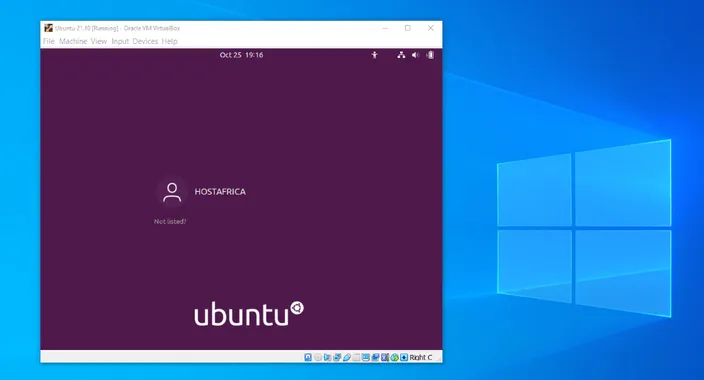
Below you can see an Ubuntu VM running on a Windows 10 laptop, a whole new virtual computer inside another computer.
Types of virtual machines
There are two main types of virtual machines - system VMs and process VMS. Here is how they are different:
- System virtual machines replicate an entire physical computer and function as independent operating systems. They are most useful for testing new environments, running multiple OS at once or consolidating physical servers to improve efficiency of data centers.
- Process virtual machines are not an entire system but rather an environment designed to run a single application on any operating system. They are great for development and debugging across many platforms.
When would you need a virtual machine?
Virtual machines were first invented way back in the day, in the 1960s-1970s, by IBM. They were an answer to a huge IT inefficiency.
Back then, each software application needed its own dedicated physical server to access the core components, like CPU or memory. Companies were worried about performance issues, so they would deliberately overestimate the hardware requirements. Consequently, the physical servers would only use a very limited part of their capacity, which meant a massive waste of resources.
The invention of virtual machines solved this problem pretty much entirely and revolutionized IT operations by allowing several virtual systems to run independently on a single physical machine. This is what laid the foundation for the modern cloud computing technology.
On an individual level, physical computers with a single operating system, like Windows, can be limiting and inefficient. They don’t always fully use the hardware resources available to them and can’t run applications designed for other operating systems.
Virtual machines solve all that. They allow you to use software designed for another OS than your original one without having to buy a new physical computer. The full separation from the original operating system also means that you can test risky applications or software without fearing damage to the host.
So how exactly do virtual machines achieve all that?
How Does a Virtual Machine Work?
Virtual machines are made possible by the process of virtualization and the software that enables this process, hypervisor. Let’s take these concepts apart and discuss how everything comes together to make IT processes more efficient.
What is virtualization and how is it implemented?
Virtualization is the process of creating a virtual version of a physical system, such as a server, desktop, or storage device.
Instead of running one operating system directly on the computer’s hardware, virtualization introduces a software layer that allows several virtual computers to run at once.
Here’s how it works in simple terms:
- The physical hardware (called the host) provides the actual computing resources.
- A piece of software called a hypervisor sits between the hardware and the virtual machines.
- The hypervisor divides up and allocates hardware resources, such as CPU, RAM, and disk space, to each virtual machine.
Each VM is a fully isolated environment, meaning they can run their own OS and function as a self-sufficient entity. The result is that we can run multiple different operating systems on a single computer or server, and divide and use its resources economically.
We can also run multiple virtual computers alongside each other, atop a single physical computer or server.
Since virtualization is essentially made possible by hypervisors, let’s discuss their types and function next.
What are hypervisors and what is their role?
A hypervisor is the key software that enables virtualization. It creates, runs, and manages virtual machines on a host computer.
It is also known as a virtual machine manager (VMM) because it does exactly that - decides how much of the physical computer’s resources, like processing power and memory, each virtual machine gets. On top of all that, it ensures they all stay isolated from one another for stability and security.
There are two main types of hypervisors:
Type-1 or bare-metal hypervisors
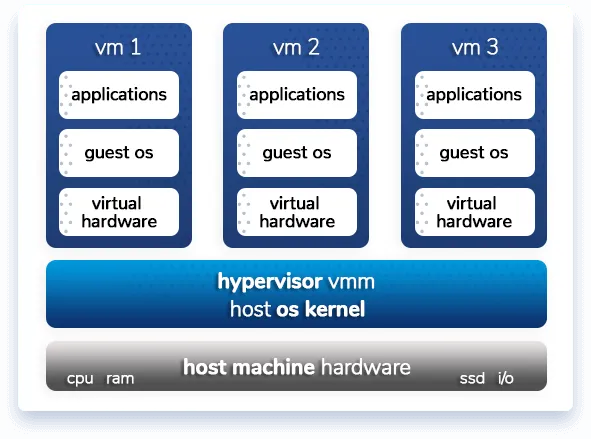
Bare-metal hypervisors, also known as Type 1 hypervisors, run directly on the physical hardware. Because of this, they offer better performance, security, and stability, so they are ideal for enterprise servers and cloud environments.
As you can see, every virtual machine has its own guest operating system, its own OS-specific applications, and its own share of virtual hardware resources, allocated by the hypervisor.
They’re widely used by hosting providers, like HostAfrica, to create high-performance virtual machines that power websites, applications, and online services. Businesses use these services for a small monthly fee to move from physical infrastructure to cloud-based systems that can be managed and scaled remotely. This service is called infrastructure as a service (IaaS) and the online or on-demand feature of this service is called cloud computing. It allows users to get root access to powerful server resources from anywhere, without investing in physical hardware.
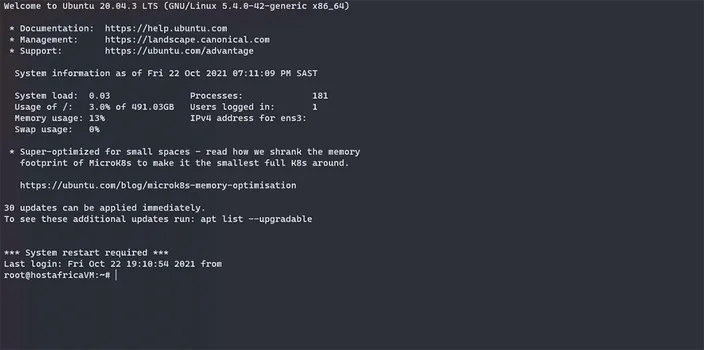
Here’s what a newly provisioned Ubuntu virtual machine from HostAfrica looks like.
Most often used for:
- Hosting websites, apps, and databases on virtual servers
- Running enterprise cloud infrastructure for companies
- Creating scalable environments that can handle traffic spikes
- Building backup and recovery systems for data protection
- Supporting remote work and collaboration tools using cloud VMs
Examples: VMware ESXi, Microsoft Hyper-V (Server), Xen.
Type-2 or hosted hypervisors
These hypervisors run as an application in an existing operating system (OS), just like any other software on a computer. The existing OS is called the host OS, and the OS running in the virtual machine is called the guest OS.
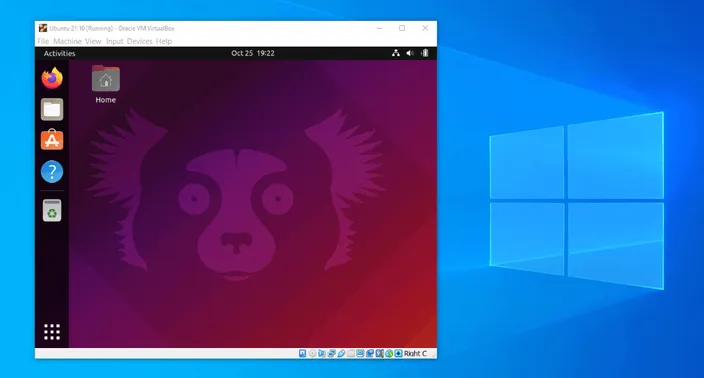
Below you can see a fully functional Ubuntu OS (guest) running alongside the laptop’s native OS Windows 10 (host).
Type-2 hypervisors are typically only used on personal computers. They allow users to run several operating systems on one computer at the same time, for example, a developer using Linux on a Windows PC. This setup, called desktop virtualization, is especially useful for testing software, learning new systems, or isolating risky files.
Examples: VirtualBox, VMware Workstation, Parallels Desktop.
Most often used for:
- Developing and testing software across different OS environments
- Running legacy programs that require older systems
- Performing cybersecurity testing or malware analysis safely
- Creating training or demo environments
- Using OS-specific apps or tools without switching computers
Are Virtual Machines Safe?
Virtual machines created with Type-1 hypervisors that run on servers are very safe. The best feature of their virtualization is that they are completely isolated environments. This means that if one VM crashes, or is hacked, the others are unaffected and can continue to deliver.
This isolation makes these virtual machines very secure against hackers and malware that spread from one part of your system to eventually infect and take over your entire system, even the hardware.
If one VM is compromised, it’s extremely unlikely a hacker or malware can escape the confines of that VM.
It’s actually why cybersecurity professionals use virtual machines to handle potential malware safely.
If it turns out to be malware, the infection is contained within that VM, and very easy to sanitise compared to physical servers or a local PC. You can simply roll back to a snapshot or restore a backup of your VM from a date when all was in working order.
How can VMs benefit my business?
Virtual machines can benefit your business in more ways than one:
- Custom work environments: Let each department choose the operating system and configuration that fits their workflow. Your IT team might need a Linux VM with multiple network adapters, while accounting can use a standard Windows setup.
- Reduced hardware costs: Cut expenses on purchasing, upgrading, and maintaining physical servers.
- Cloud-ready architecture: Virtual machines integrate seamlessly with cloud platforms so that it’s easy for your business to migrate workloads and operate as a cloud-first organization.
- Scalable and future-proof infrastructure: Perfect for hosting websites, applications, and production systems that need to grow over time. Easily scale computing power and storage as your business expands.
- Simplified maintenance and monitoring: centralize the management of updates, performance, and resources. Add CPU, memory, or network capacity on demand without downtime or physical intervention.
Virtual Machines vs Containers
If you’re researching virtual machines, chances are you came across the term “container” too. So how are the two different and when is each most useful?
As already established, virtual machines virtualize the underlying hardware. Each VM emulates a full machine: it includes a guest operating system, virtualized CPU, memory, storage, and networking. The hypervisor manages the abstraction between real hardware and VMs.
Containers virtualize at the operating system level. Instead of creating a full computer with its own operating system, a container only includes the app and everything that app needs to run. It shares the main operating system of the host computer to stay lightweight and fast. Special OS features keep containers separated from each other so they don’t interfere.
Here is a comparison:
| Feature | Virtual Machines (VMs) | Containers |
| What they are | Full virtual computers that run their own operating system. | Lightweight packages that run apps using the host’s operating system. |
| Isolation | Very strong — each VM is fully separate from others. | Moderate — share the same OS kernel but keep apps apart. |
| Startup time | Slower (need to boot a full OS). | Faster (start instantly). |
| Performance | Uses more memory and storage. | Uses fewer resources, runs more efficiently. |
| Best for | Running multiple operating systems, testing safely, or hosting servers. | Building and deploying apps quickly, like in cloud or DevOps environments. |
Conclusion
Virtual machines have completely changed the way we use computers and manage resources. They let multiple systems run side by side on the same physical device, making the most of your hardware while keeping everything secure and separate. You can test new software, switch between operating systems, or even power large-scale cloud environments - all thanks to virtualization.
While containers are great for lightweight, fast-moving applications, virtual machines still carry a lot of value when you need strong isolation, flexibility, and the ability to run different operating systems. Learning how VMs work is a great step towards understanding how our everyday technical infrastructure functions or building more efficient, scalable, and future-oriented IT systems.
Virtual Machines FAQ
1. What exactly is a virtual machine (VM)?
A virtual machine is a software-based copy of a physical computer, complete with its own virtual processor, memory, storage and network interfaces. It runs on a host system and behaves like an independent machine.
2. How does a virtual machine work in simple terms?
A virtual machine works with the help of a hypervisor (also called a virtual machine monitor) which sits between the physical hardware (the host) and the guest virtual machines, allocating CPU, RAM, storage and networking resources so each VM runs as though it were a separate computer.
3. Why would someone use a virtual machine instead of just running software directly on their computer?
Because a virtual machine allows you to run multiple operating systems side-by-side on the same hardware, test applications in isolated environments, use legacy or incompatible operating systems without dedicated hardware, and improve resource utilisation which can save cost and increase flexibility.
4. Are virtual machines safe and isolated from the host system?
Yes. One of the key advantages of virtual machines is that they offer strong isolation from the host system: if one VM crashes or is compromised, the other VMs and the host are typically unaffected because the hypervisor ensures each VM runs in its own separate environment.
5. How do virtual machines compare to containers?
Virtual machines virtualize the hardware layer, enabling each VM to run its own full operating system and virtual hardware, while containers virtualize at the OS level so they share the host OS kernel. As a result VMs offer stronger isolation and support multiple OS types, but containers are more lightweight and start up faster.
6. What are the disadvantages of using virtual machines?
The main drawbacks of VMs include performance overhead, since each one runs a full operating system, and higher resource usage compared to containers. They also require ongoing management to prevent “VM sprawl” (too many idle or duplicate VMs) and may involve extra software licensing costs for multiple guest operating systems.
7. How does virtualization affect performance?
Because a VM runs on virtualized hardware rather than directly on the physical CPU and memory, performance can be slightly slower compared to running the same tasks natively. Modern hypervisors minimize this gap significantly, but resource-intensive applications like gaming or high-end 3D rendering still perform better on bare metal.
8. Can I run virtual machines in the cloud instead of on my computer?
Yes, absolutely. Most major cloud platforms, such as AWS EC2, Microsoft Azure, and Google Cloud Compute Engine, run on virtual machine infrastructure. Cloud VMs offer the same benefits as local ones but add scalability, redundancy, and global accessibility. This model is called Infrastructure as a Service (IaaS).
9. How many virtual machines can I run on one host computer?
That depends entirely on your hardware specifications and how resource-hungry each VM is. For example, a laptop with 16 GB of RAM might comfortably run two or three lightweight VMs, while a powerful server with 256 GB RAM and multi-core CPUs can host dozens. Overcommitting resources can lead to lag or crashes, so balancing allocations is key.
10. Can containers and virtual machines be used together?
Yes, and they often are. Many organizations run containers inside virtual machines to combine the best of both worlds: VMs provide strong isolation and system-level security, while containers offer lightweight, fast deployment for individual applications. This hybrid approach is common in modern cloud-native and DevOps environments.