You can achieve virtually anything on a Linux operating system using a command. Whether you want to send a file to the printer, set up your system firewall, or edit a file without even opening it; you can do it all directly from the terminal. Don't forget to read our guide: Grep command in Linux.
There're thousands of commands available on any Linux system and more handed to you whenever you install new software or packages. It’s a common misconception amongst beginners that you have to cram all of these commands in order to be considered an expert, but in reality, you only need to know a small subset of commands to become a proficient Linux administrator.
In this article, we'll be sharing 100+ such commands across different categories along with a downloadable cheat sheet.
Basic Commands
Command
Description
| Command | Description |
|---|
ls
|
Show all files and directories present in the working directory |
| Command | Description |
|---|
ls -l
|
Show all files and directories along with details like ownership, size, and when they were last modified |
| Command | Description |
|---|
ls -t
|
Sort the output of ls by last modified date |
| Command | Description |
|---|
pwd
|
List the path of the current working directory |
| Command | Description |
|---|
cd directory
|
Switch to a different working directory |
| Command | Description |
|---|
cd ..
|
Move up one directory level |
| Command | Description |
|---|
cd /
|
Switch to the root directory |
| Command | Description |
|---|
clear
|
Wipe out all the text from the terminal screen |
| Command | Description |
|---|
history
|
Print out all the previously executed commands in the current session |
| Command | Description |
|---|
touch filename
|
Create a new file |
| Command | Description |
|---|
vi filename
|
Open a file for editing |
| Command | Description |
|---|
cat filename
|
Display the contents of a file |
| Command | Description |
|---|
hostnamectl
|
List system information, including kernel, release, architecture, and virtualization etc. |
| Command | Description |
|---|
ifconfig
|
Show the network interfaces, IP addresses, and MAC address of the system |
| Command | Description |
|---|
date
|
Print the current system date and time |
| Command | Description |
|---|
top
|
List all the running processes on the system |
| Command | Description |
|---|
free -m
|
Show memory usage stats |
| Command | Description |
|---|
head filename
|
Display the first 10 lines of a file |
| Command | Description |
|---|
tail filename
|
Display the last 10 lines of a file |
| Command | Description |
|---|
mv file /new/file/path
|
Move the file to a different location |
| Command | Description |
|---|
mv filename new_filename
|
Rename a file |
| Command | Description |
|---|
cp filename new_filename
|
Copy a file |
| Command | Description |
|---|
man command_name
|
List helpful information regarding a command |
| Command | Description |
|---|
rm filename
|
Delete a file |
| Command | Description |
|---|
rm –rf directory_name
|
Remove a directory and its contents |
| Command | Description |
|---|
sudo
|
For regular users to run commands with elevated privileges |
| Command | Description |
|---|
mkdir directory_name
|
Create a new directory |
| Command | Description |
|---|
kill pid
|
Kill a process using its process ID |
| Command | Description |
|---|
reboot
|
Restart the system |
| Command | Description |
|---|
shutdown –h now
|
Turn off the system |
Networking Commands
Command
Description
| Command | Description |
|---|
dig domain_name
|
Show the DNS related information of the given domain name |
| Command | Description |
|---|
dig -x host
|
Perform a reverse lookup for a host |
| Command | Description |
|---|
host domain_name
|
Perform DNS lookup of the given domain name which prints out the IP address |
| Command | Description |
|---|
whois domain_name
|
For more information about a domain |
| Command | Description |
|---|
ping ip
|
Check the connectivity between your host and the given IP address |
| Command | Description |
|---|
ssh username@ip
|
To securely log in as the specified user on another server |
| Command | Description |
|---|
wget file
|
Download a file |
| Command | Description |
|---|
wget -c file
|
Continue a stopped download |
| Command | Description |
|---|
traceroute domain_name
|
Trace the route a packet will take when travelling from your machine to a host |
| Command | Description |
|---|
telnet domain_name port
|
Connect to a remote host on a specific port |
| Command | Description |
|---|
netstat –pnltu
|
Display all currently listening ports |
| Command | Description |
|---|
route
|
Display the routing table for your machine |
| Command | Description |
|---|
arp
|
View the contents of the ARP (address resolution protocol) table |
| Command | Description |
|---|
cat /etc/resolv.conf
|
See the DNS servers that your machine is currently using |
| Command | Description |
|---|
tcpdump -i eth1 'port 80'
|
Log and monitor all incoming traffic on port 80 |
| Command | Description |
|---|
nmap ip
|
Network discovery of the given IP. Find out whether the host is up, which ports are open etc. |
Search Commands
Command
Description
| Command | Description |
|---|
locate keyword
|
Search for a file or directory in a pre-compiled cache. Much faster than find but many not show all results |
| Command | Description |
|---|
find keyword
|
Search for a file or directory in the real system. Much slower than locate but is always up-to-date |
| Command | Description |
|---|
find /home -name *.ext
|
Search for the given extension in the /home directory and all its sub-directories |
| Command | Description |
|---|
find / -type f ! -perm xxx
|
List all files that don’t have the specified permission |
| Command | Description |
|---|
find / -perm /u=r
|
Display all the read-only files |
| Command | Description |
|---|
grep keyword filename
|
Search for the specified keyword/pattern in the given file |
| Command | Description |
|---|
grep keyword *
|
Search for the specified keyword/pattern across all files in the current directory |
| Command | Description |
|---|
grep -i keyword *
|
To ignore case while searching |
| Command | Description |
|---|
grep -r keyword *
|
Perform a recursive search, i.e. include the sub-directories in the search |
| Command | Description |
|---|
grep -x 'what to match' *
|
Print all the lines where a match was found |
| Command | Description |
|---|
grep -c keyword *
|
Count the number of matches |
Permissions Commands
Command
Description
| Command | Description |
|---|
chmod xxx filename
|
Assign the specified permissions to a file |
| Command | Description |
|---|
chmod –R xxx directory
|
Assign the specified permissions to a directory, and all its sub-directories |
| Command | Description |
|---|
chmod –x filename
|
Remove the execution permissions from a file |
| Command | Description |
|---|
chown username filename
|
Change the ownership of the specified file |
| Command | Description |
|---|
chown username:groupname filename
|
Change the ownership and the group ownership of a file |
| Command | Description |
|---|
chown username:groupname filename1 filename2 filename3
|
Change the ownership and the group ownership of multiple files |
| Command | Description |
|---|
chown --from=bob alice filename
|
Change the ownership of a file only if it’s owned by a specific user (added after --from=) |
| Command | Description |
|---|
chown -h usergroup symbolic_link
|
Forcefully change the owner and group of a symbolic link |
Storage Commands
Command
Description
| Command | Description |
|---|
df –h
|
List storage related information of all partitions, including overall size, free space, and used space etc. |
| Command | Description |
|---|
mount
unmount
|
Mount or unmount an ISO file or a storage device |
| Command | Description |
|---|
du -h /home/directory_name
|
Find the directory size in a human readable format |
| Command | Description |
|---|
du -sh /home/directory_name
|
To get the total size of a directory |
| Command | Description |
|---|
du -ah --exclude='*.xxx' /home/directory_name
|
Display the disk usage of all files in a directory, excluding files with the given extension |
| Command | Description |
|---|
du -ha --time /home/directory_name
|
Display disk usage of a directory by modification time |
| Command | Description |
|---|
fdisk -l
|
Show disk size along with partitioning information |
| Command | Description |
|---|
sudo du -x / | sort -nr | head -20
|
List the top 20 directories that are overconsuming resources |
User Management Commands
Command
Description
| Command | Description |
|---|
adduser username
|
Add a new user |
| Command | Description |
|---|
userdel -r 'username'
|
Delete a user |
| Command | Description |
|---|
passwd -l 'username'
|
Change the password of a user |
| Command | Description |
|---|
whoami
|
See the currently logged in user |
| Command | Description |
|---|
usermod -c 'This user will be deleted tomorrow' username
|
To add a comment to a user account |
| Command | Description |
|---|
cat /etc/passwd
|
Display a list of all users with additional info |
| Command | Description |
|---|
usermod -d /home/test username
|
Change the home directory of a user |
| Command | Description |
|---|
sudo deluser username group_name
|
Remove a user from a group |
| Command | Description |
|---|
usermod -a -G group_name username
|
Add a user to a group |
| Command | Description |
|---|
groupadd group_name
|
Create a new group |
| Command | Description |
|---|
groupdel group_name
|
Delete a group |
| Command | Description |
|---|
id
|
Display the user ID, group ID, and groups for the current user |
Archive Commands
Command
Description
| Command | Description |
|---|
tar -cvf archive.tar filename.txt
|
Compress a file into a tar archive |
| Command | Description |
|---|
tar -tvf archive.tar
|
Display the contents of a tar archive |
| Command | Description |
|---|
tar -xvf archive.tar filename.txt
|
Extract a single file out of a tar archive |
| Command | Description |
|---|
zip archive.zip file1.txt file2.html file3.jpg
|
Create a zip archive using multiple files |
| Command | Description |
|---|
zip -u archive.zip filename.txt
|
Add a file to an already zipped file |
| Command | Description |
|---|
zip -d archive.zip filename.txt
|
Delete a file from a zip archive |
| Command | Description |
|---|
unzip archive.zip
|
Unzip a zip archive |
| Command | Description |
|---|
unzip archive.zip -d /directory_name
|
Unzip a zip archive to a specific directory |
| Command | Description |
|---|
tar xf archive
|
Extract archive of any type |
| Command | Description |
|---|
gzip filename
|
Compress a file and add the .gz extension to it. This will delete the original file |
| Command | Description |
|---|
gzip -c filename > archive.gz
|
Create a new compressed .gz file, preserving the original |
Advanced Commands
Command
Description
| Command | Description |
|---|
ps –ef | grep process_name
|
Check whether a specific process is running |
| Command | Description |
|---|
netstat –pnltu | grep port
|
Check whether a specific port is open |
| Command | Description |
|---|
history | grep keyword
|
Search for something in the history |
| Command | Description |
|---|
ip r
|
Display the IP address of the default gateway |
| Command | Description |
|---|
ssh-keygen
|
Generate SSH keys to allow public key based secure login |
| Command | Description |
|---|
scp filename user@ip:/home/location
|
Securely copy a file to a remote host |
| Command | Description |
|---|
find / -type f -perm 777 -print -exec chmod xxx {} \;
|
Find all the files that have 777 permissions, and modify them to xxx |
| Command | Description |
|---|
sed -i 's/CONTENT_TO_REPLACE/CONTENT_TO_REPLACE_IT_WITH/g' filename
|
Replace the specified content in a file with something else |
| Command | Description |
|---|
tcpdump -nnvvS src SRC_IP and dst port xxxx
|
Monitor all traffic emerging from a certain IP and going towards a certain port |
| Command | Description |
|---|
traceroute domain_name -q 5
|
Send 5 packets per hop while tracing the route to the given domain name |
Downloadable Cheat Sheet
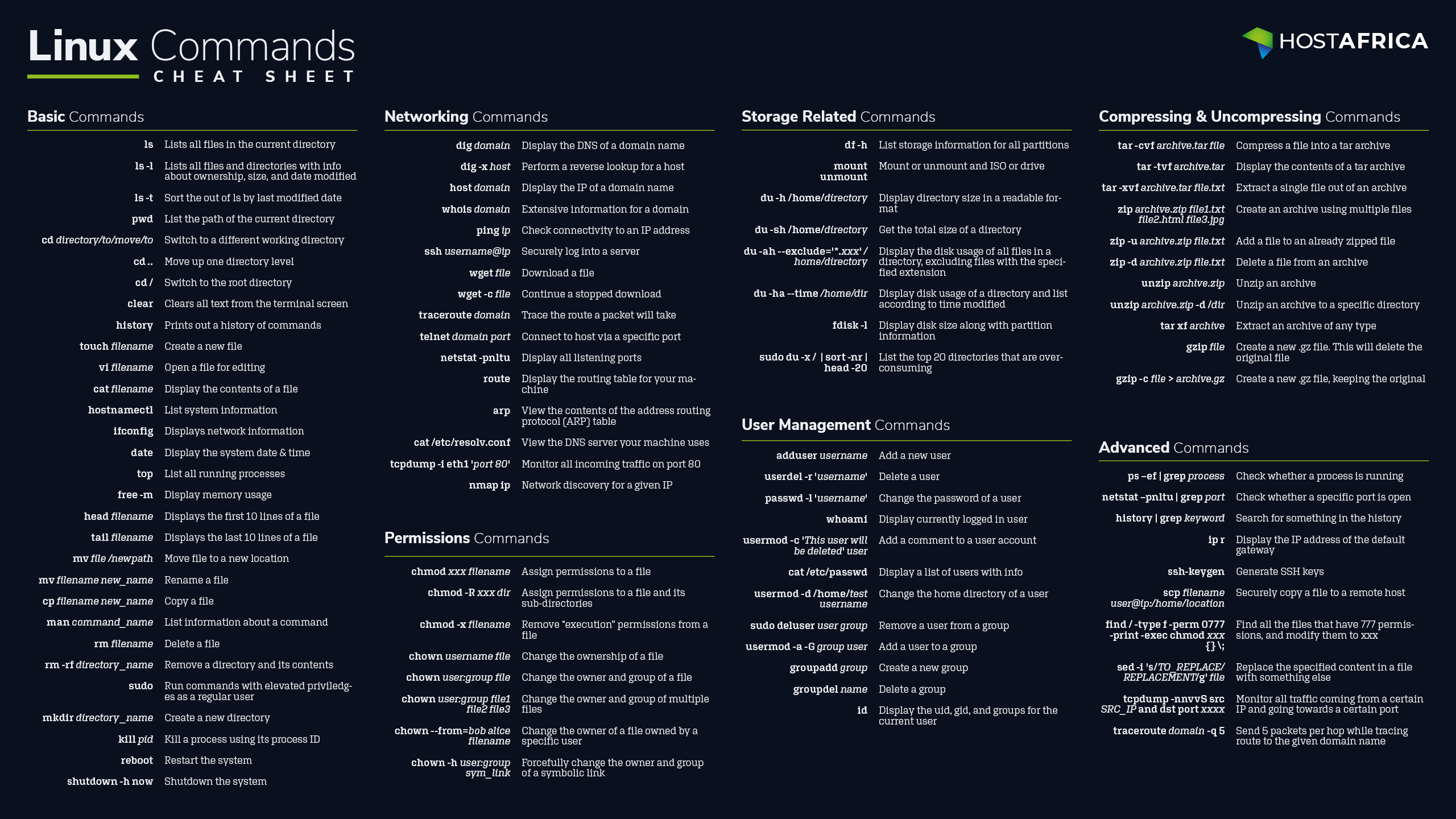
Download the 2560x1440 wallpaper cheat sheet for easy reference.
Download the Cheat Sheet