Every website sits at a number, something like 93.184.216.34. Nobody wants to memorise that in order to access a website, so we use names instead: google.com, facebook.com, ifeomaparfume.com.ng, or any domain name you’ve ever used. DNS is the internet’s phone book, which maps the human readable domain name to the number.
DNS records are the entries in that phone book. Each one’s an instruction in your domain’s settings, which tells the internet where to find something that belongs to you. One record points to where your website lives, another says where your email goes.
In this article, we’ll clarify what a DNS record is, analyse 5 most common DNS record types, when you might need to change them, and where to do so. Read this guide carefully and the next time your tech support asks you to update your MX records, the conversation will make a lot more sense.
What is a DNS Record?
A DNS record is one instruction in your domain’s settings. Each one answers a single question: where’s the website, where does email go, what does this subdomain point to.
Depending on the record type, they’re composed of numbers, letters, or both. Either way, they would look like gibberish without context.
Here’s an example of DNS records you’ll see as you manage your domain :
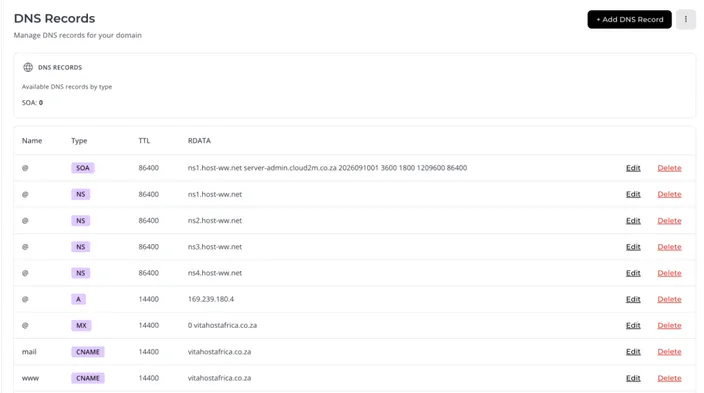
If you want your website up and running, you have to get your DNS records right. Make a mistake, and next thing you know, your website’s broken and no one’s getting emails from you.
How does a DNS record function in practice
Your domain doesn’t contain your website, it simply points at the website. That’s why you can register your domain with one company and host the site somewhere else.
So when someone types ifeomaparfume.com.ng into a browser, their computer reads the A record responsible for pointing to the website, finds the server address, and loads the site from there.
Nameservers and DNS zone
Before we look into the different DNS records, we need to understand where they live, because these terms will come up.
All of the DNS records together make up what’s called your DNS zone. In total there are around 60 DNS records useful in everyday context, but in your hosting panel you’ll see around 15 and interact with even less.
You’ll hear about NS records too. These point to the servers, called nameservers, that hold your DNS zone.
NS records are different from the other DNS records we’ll discuss in one important way: they decide which panel all your records live in instead of one specific thing about your website.
NS records are managed under your domain registrar, a place where you registered your domain. If that’s HostAfrica, you’ll find it in your Direct Admin area under Manage Nameservers.
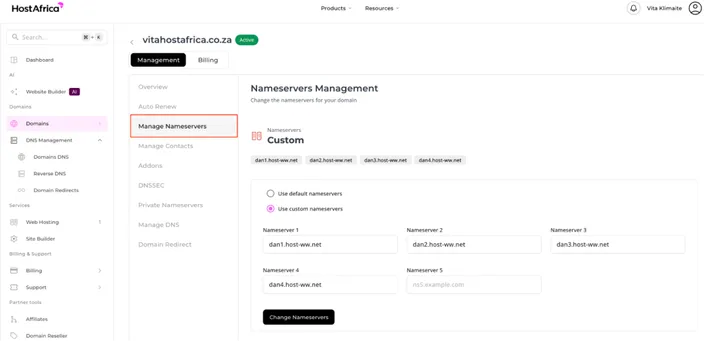
You rarely touch them, only when you move your DNS to a new provider. But change them carefully. Get them wrong and everything stops at once – website, email, everything.
DNS Records That Matter for Every Website Owner
You won’t need to concern yourself with the majority of the DNS records that exist. However, here are the five you’ll very likely run into:
| Record | What it does | When you need it |
|---|---|---|
| A | Points a domain at an IPv4 address (where the website lives) | Pointing your domain at a web server |
| AAAA | Same as A, but for IPv6 addresses | Modern hosting that supports IPv6 |
| CNAME | Points one hostname at another hostname (an alias) | www version of the website pointing at your root domain |
| MX | Names the mail server that handles your email | Setting up email on your own domain |
| TXT | Holds a text value. Used for SPF, DKIM, DMARC and domain verification | Email deliverability, and verifying ownership with Google or Microsoft |
Now let’s look into the ones you might actually need to get your hands on:
A and AAAA
An A record stores a number address, like 102.89.44.10. That’s the actual location of the server your site sits on.
AAAA does the same job using the newer, longer style of address. We need it because, simply put, the old style’s running out of options. If your host gives you both, add both. If they only give you one, that’s fine too.
When to edit an A/AAAA record: You update these DNS records when your website moves to a new server.
CNAME
A CNAME doesn’t hold an address, it holds another name.
The most common example is www. You set www.ifeomaparfume.com.ng as a CNAME pointing at ifeomaparfume.com.ng, so visitors reach your site whether or not they type the www.
The other common use is a third-party service. If you run an online store or a booking platform that somebody else hosts, they’ll usually ask you to point a subdomain at them with a CNAME. Something like shop.ifeomaparfume.com.ng.
In this case, why a CNAME instead of an A record? Because if your provider ever changes servers, they handle the change on their end, you don’t need to do anything.
MX
MX records tell the world which mail server receives your emails.
Two things are worth noting about MX records:
- MX records point at a hostname, such as mx1.mailprovider.com, not an IP address. If someone gives you a number to put in an MX record, there’s a misunderstanding, ask again.
- Each MX record has a priority number in front of it. Lower numbers get tried first. Higher numbers are backups, used when the first server doesn’t answer. Most email providers give you two or three records with different priorities. Enter them exactly as given.
Don’t copy MX records from a guide you found online, they differ per provider, and the wrong ones straight up stop your mail.
TXT
A TXT record just holds text. That sounds rather useless until you see what the text is used for.
- SPF lists which servers are allowed to send email using your domain name. Without it, any scammer can send messages that appear to come from you.
- DKIM adds a digital signature to your outgoing email, so the receiving server can confirm that no one touched the message along the way.
- DMARC tells receiving servers what to do when a message fails those checks: ignore it, send it to spam, or outright reject it.
Together, these three TXT records are the difference between your invoices landing in the inbox versus landing in the junk folder. If your email keeps going to spam, TXT records are the first place you should look.
TXT records are also used for verification. When Google or Microsoft asks you to prove you own the domain, they hand you a string of characters to add as a TXT record. Then they check for it and confirm you own the domain.
Where You Edit Your DNS Records
For HostAfrica customers, DNS records are managed from your Dashboard.
- Go to DNS Management dropdown and click on Domains DNS. Find the domain you need and click on Manage DNS.
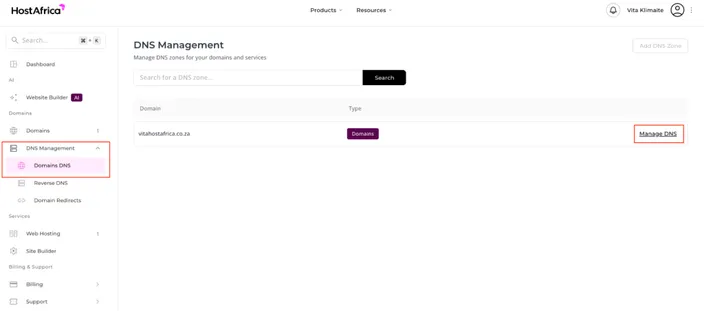
Two things worth checking first.
- Are your nameservers pointed at us? If you have moved your nameservers to Cloudflare or another DNS provider, your records live there instead. Editing them in our panel won’t do anything, because nothing’s reading that zone anymore.
- Do you know if you need to edit a DNS record or add a new one? Adding a second A record when you meant to edit the first one is a common mistake. In this case, edit the existing record rather than creating a duplicate.
Remember, DNS records aren’t there to mess with, especially if your site already has traffic. If you’re not sure, our support team can look at the zone with you before you change anything.
A Note on DNS Propagation
DNS changes aren’t instant.
Servers all over the world keep a saved copy of your records so they don’t have to look them up at authoritative dns servers every single time. When you make a change, those saved copies have to expire before everyone sees the new version.
For a normal record edit, expect anywhere from a few minutes to a few hours. For a nameserver change, allow up to 24 to 48 hours to be safe.
You can watch DNS propagation happen at whatsmydns.net. Enter your domain, pick the record type, and it shows what servers around the world are currently returning. Some will show the new value before others, that’s normal.
If you’re a client of HostAfrica, you can check your DNS propagation status by going to DNS Management and straight into Domain DNS. Then switch DNS Records to Propagation, select the record type and click Check Propagation.
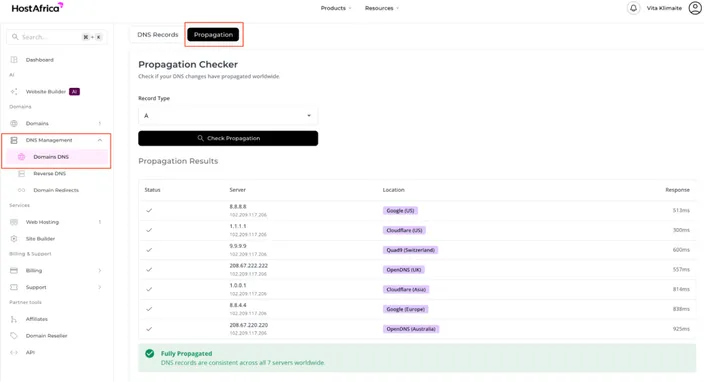
The main thing is this: don’t do the thing where you change a record, notice no difference after ten minutes, and change it again. That’s how people end up with a broken DNS zone and no idea which edit caused it.
DNS Records FAQ
What is a DNS record?
A DNS record is an instruction in your domain’s settings that tells the internet where to find something connected to your domain, such as your website, your email, or a service like an online store.
What is an A record?
An A record points your domain at the IPv4 address of the server hosting your website. It’s the record that makes your domain load your site. You update it when your site moves to a new server.
What is an MX record and do I need one?
An MX record names the mail server that receives email for your domain. You need one if you want email on your own domain name, like _sales@ifeomaparfume.com.ng._ If you only use Gmail or Yahoo addresses, you don’t.
What is the difference between an A record and a CNAME record?
An A record points at a numerical address. A CNAME points at another name. Use an A record when you have a server address from your host. Use a CNAME when you are pointing at a service someone else runs, so their address changes don’t break your setup.
What are SPF, DKIM and DMARC?
They are three email security settings, all stored as TXT records. SPF says who may send email as you. DKIM signs your outgoing mail. DMARC says what to do with mail that fails those checks. They protect your domain from being used by scammers and keep your own email out of spam folders.
How long do DNS changes take?
A record edit usually takes minutes to a few hours. A nameserver change can take up to 24 to 48 hours.
Need a Hand With Your DNS Records?
DNS is one of those things that’s simple once someone shows you, and nerve-racking the first time you actually need to change something.
If you’d rather not do it yourself, our support team will gladly walk you through it or even make the change for you. Open a ticket with your domain name and what you’re trying to set up, and we’ll take it from there.